
2027 Seminar Registration
INSTRUCTIONS
Registering for the MGS 2027 Virtual Seminar is completed online in two stages:
First you place your order on our registration page,
Then you pay securely through PayPal. Members pay $35 and non-members pay $50.
Please read the steps below before you begin.
REGISTRATION INSTRUCTIONS
• MEMBERS: You must log-in to the Members Only section prior to registration to obtain member pricing.
• NON-MEMBERS: To receive member pricing, first join MGS, then log in to the Members Only section before you register. If you prefer not to join, you may register at the non-member price.
COST: Member Registration: $35; Non-Member Registration: $50
REGISTRATION & PAYMENT PROCESS:
Part 1: On the MGS Website
1. Set the Quantity to 1 and click the “Add to Cart” button. We ask that one registration be processed per transaction so that we get everyone’s personal contact information.
2. You will be taken to “Order Information” where you preview the order; then you click on the “Checkout” button.
3. The “Order Form” opens and requests the following:
- Purchaser Information: Enter your name, address, telephone number, and email address. Check your email address carefully to be sure it is entered accurately, because we use it for Registrant/Attendee correspondence, including the Virtual Seminar Link and the Seminar Syllabus/Handouts (PDF).
- Payment Method: PayPal processes all transactions. You may pay by credit card, debit card, or PayPal account. You do not need a PayPal account to pay by credit or debit card.
4. To complete your order, you now need to make a payment. Click the blue “PAY NOW” icon, which takes you to the PayPal website. Continue with Part 2 below.
Part 2: On the PayPal Site (you are now leaving the MGS website to complete payment)
1. After you connect to PayPal, choose “Pay with a Debit or Credit Card.” If you have a PayPal account, you may use it instead of a card.
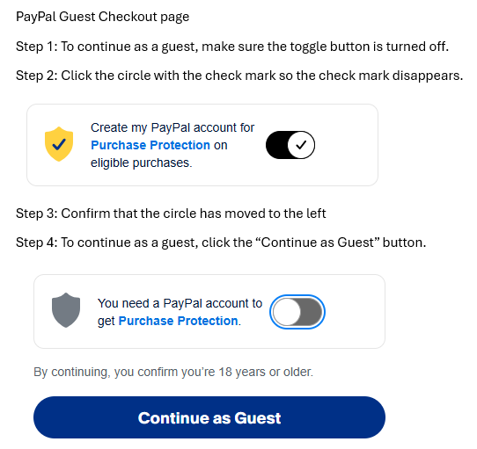
2. On the PayPal Guest Checkout page, enter your credit card information, billing address, and contact information. Near the bottom, PayPal offers a last-chance option to create a PayPal account. You must turn this off to continue as a guest: click the circle with the check mark so the check mark disappears and the circle moves to the left. Once the check mark is gone, the “Continue as Guest” button will appear. Click “Continue as Guest” to submit your payment.
3. Your registration and payment are now complete. PayPal will display a confirmation and transaction summary page; please keep it for your records.
4. After a successful transaction you will receive a confirmation email, the MGS Store Order Summary. It includes your Order Number, Order Date, Items Ordered and a thank-you for your purchase.
5. As the seminar date approaches, you will receive additional correspondence, including the Virtual Seminar Link and the Seminar Syllabus/Handouts (PDF).
